

 Michael Satterfield
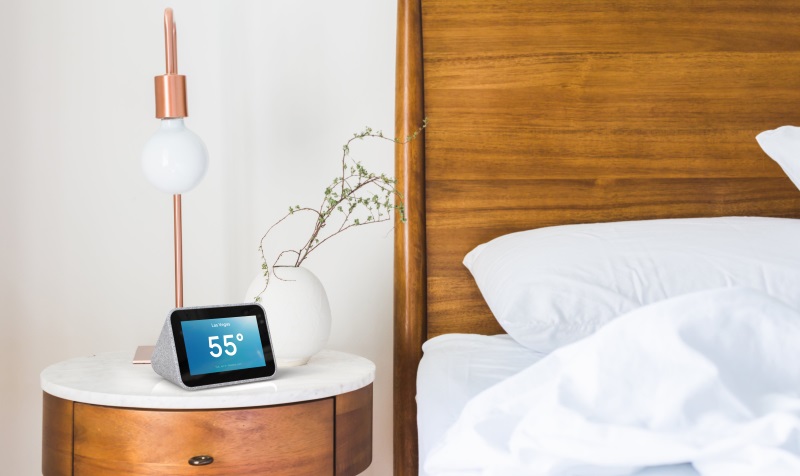
This week I have been testing out the new Lenovo Smart Clock with Google Assistant. As part of the growing number of smart devices in the house, from robotic lawnmowers and vacuum cleaners to home security systems and refrigerators with screens in them, the thought of adding one more app to your phone can be a little overwhelming. So I was very glad when I found out that the Lenovo Smart Clock worked with my already existing Google Home App. Setting it up was easy, simply turn it on, add it to the Google Home app, connect it to wifi, and let it update.
Once connected to Google Home, you can control your other smart home devices and access them via “Hey Google” voice commands through the clock. The alarm function allows you to wake up to hundreds of sounds, tap anywhere to snooze it, and after setting up a “Good Morning” routine I wake up with updates on the weather, local news, and anything that is on my Google Calendar for the day. Your morning routine can even start before you get up if you have smart lights connected to your Google Home the lights can be set to progressively brighten until your wake-up time.

I like the style of the Lenovo Smart Clock, it has a clean contemporary look and is very simple to set up and use. I also like that the microphone function can be muted with a switch on the back and it has a USB port perfect for charging my phone at night. The 4″ touch screen is clear, bright, and intuitive. You can also change the display settings to match your style or mood.
At just $59.99 the Lenovo Smart Clock is an affordable way to add a Google Home hub to your home or apartment as it can interface and control thousands of appliances and devices that are part of the Google smart device network. While there are several other home hubs, none are as unobtrusive as the
Overall I have been impressed with the Lenovo Smart Clock, I have even noticed a reduction in my screen time on my phone since I can ask about the weather, news, and calendar reminders by just saying “Hey Google.” If you are considering getting a smart device but are a little intimidated about the learning curve the Smart Clock is a great way to try out some smart technology and being part of the Google network of devices you can add more devices as you get more comfortable.
If you would like more info check out Lenovo.com.

Lenovo sent the Smart Clock to me to test at no charge, however, I was not paid for this post and all opinions are my own.




















This is a fantastic and thorough review of the Lenovo Smart Clock! You’ve perfectly captured its greatest strength: seamless integration into an existing Google ecosystem without adding complexity. The setup process you described is a major selling point for anyone hesitant to adopt more smart home tech. Its affordability and ability to reduce phone screen time are also huge benefits for mental clarity and daily convenience.
Your point about the Smart Clock acting as a central, unobtrusive hub is key. It’s a reminder that effective smart home technology isn’t just about individual devices—it’s about creating a responsive, interconnected system where data flows instantly and reliably. This need for speed and responsiveness behind the scenes is where high-performance hardware, like a Solid State Drive PCI-E SSD 3.2TB-MU-2.5Inch This is a fantastic and thorough review of the Lenovo Smart Clock! You’ve perfectly captured its greatest strength: seamless integration into an existing Google ecosystem without adding complexity. The setup process you described is a major selling point for anyone hesitant to adopt more smart home tech. Its affordability and ability to reduce phone screen time are also huge benefits for mental clarity and daily convenience.
Your point about the Smart Clock acting as a central, unobtrusive hub is key. It’s a reminder that effective smart home technology isn’t just about individual devices—it’s about creating a responsive, interconnected system where data flows instantly and reliably. This need for speed and responsiveness behind the scenes is where high-performance hardware, like a Solid State Drive PCI-E SSD 3.2TB-MU-2.5Inch, becomes relevant. While the Smart Clock itself doesn’t need that kind of power, the home server or NAS storing your smart device data, security footage, or personal media libraries certainly would. A drive like this ensures that your entire smart ecosystem—from video doorbell feeds to automated lighting routines—operates without lag, providing the instant responsiveness that makes smart homes feel truly intelligent. It’s the unsung hero that keeps your digital life running smoothly.
Thanks for sharing such a practical and convincing endorsement! This definitely makes the Smart Clock seem like the perfect entry point into a smarter home.
, becomes relevant. While the Smart Clock itself doesn’t need that kind of power, the home server or NAS storing your smart device data, security footage, or personal media libraries certainly would. A drive like this ensures that your entire smart ecosystem—from video doorbell feeds to automated lighting routines—operates without lag, providing the instant responsiveness that makes smart homes feel truly intelligent. It’s the unsung hero that keeps your digital life running smoothly.
Thanks for sharing such a practical and convincing endorsement! This definitely makes the Smart Clock seem like the perfect entry point into a smarter home.